
 Version Française
 WikipédiA
 |
Texas Instruments TI 92 II
Version Française |
WikipédiA |
 |
 |
 |
 |
 |
 |
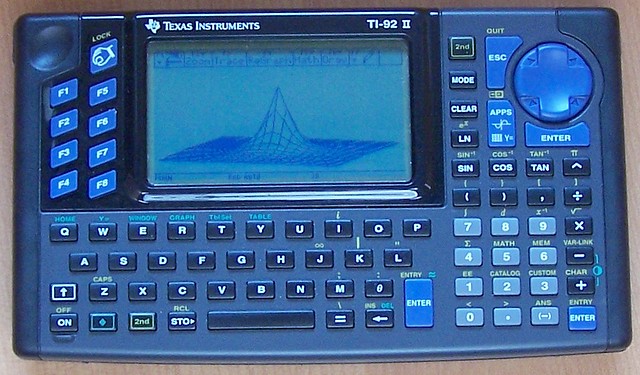
| What's in the box? | Development tools | My programs |
| A powerful tool for symbolic calculation adapted from DERIVE. Exact calculation, natural display, integration, equation solver, etc... | 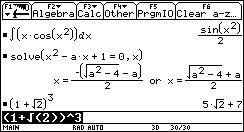 |
 | Grapher 2D, parametric, polar, 3D. Here you can see some curves from the family x^2-k*x+1 with four values of k. (If k is an array, then the grapher automatically displays a curve for each value from the array!) |
| A good tool adapted from CabriGéomètre, user friendly and powerful. Here you can find the construction of a parabola (trace of the point M when H moves on the horizontal line). | 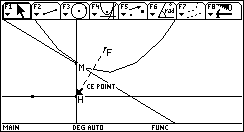
|
| Hard to read on the screen of the TI 92! Each pixel has a shadow on the background and if you don't look at the screen with the same direction as the light, you see eveything in double! This photo was hard to take, but looking at the bottom right corner you'll read "{ -1" with a shadow for each character. |
 |
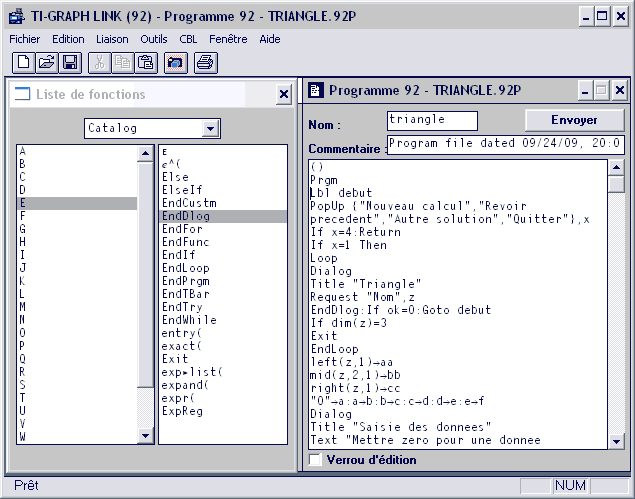 |
The tool TI Graph Link allows you to manage the files of your calculator from a PC. Its main features are:
|
| When you want to capture the screen, this dialog box opens and allows you to get the screen and save it. Thre file formats are available:TIF, EPS ou PIC. |
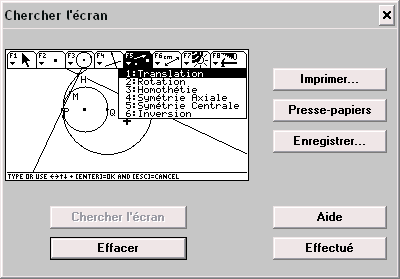 |
|
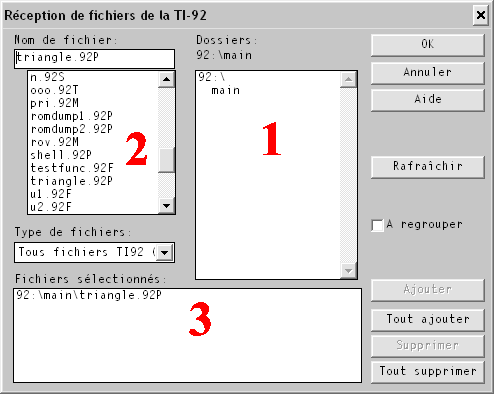
Sending or receiving files is really easy. A fileselector opens (you can see it in "receive mode").
There are three zones:
|
The TI-92 and TI-92II can't run assembly programs written for the MC68000.
They need the FARGO extension to do it and act as a TI-92+. The Fargo pack, version 2, can be dwonloaded HERE.
To install FARGO on the calculator, I used TI Graph link. This requiered three steps:
If you want to test your installation, send every *.92P file from the folder prgm of FARGO: they are demonstration programs. |
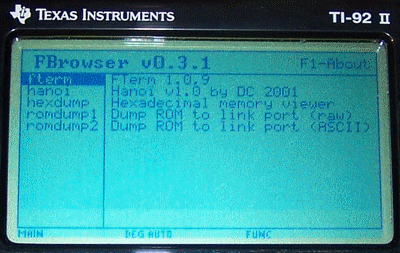 To ensure that FARGO is correctly installed type  and and  this combination, available at every time, enters FBrowser, the program launcher for Fargo.
Note that every program comes with a short description. |
Once again I use Qedit with its editable menus.
This way I get:
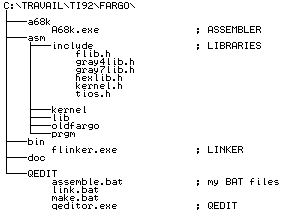
Here is the tree of my own installation. I will create three BAT files in the Qedit folder and then modify its menu settings. |
|
|
The file ASSEMBLE.BAT
Turns the source file into an object file @echo off c:\travail\ti92\fargo\a68k\a68k %1 -g -t -ic:\travail\ti92\fargo\asm\include pauseThe file LINK.BAT Turns the object file into a 92P program @echo off c:\travail\ti92\fargo\bin\flinker -vo %1.92p %1.o del %1.o>nul pause |
The file MAKE.BAT
The two previous steps but at once @echo off if not exist %1.asm goto error0 call c:\travail\ti92\fargo\qedit\assemble.bat %1.asm echo ÿ if not exist %1.o goto error1 c:\travail\ti92\fargo\bin\flinker -vo %1.92p %1.o del %1.o>nul goto end :error0 echo File not found: %1.asm goto end :error1 echo There were errors. :end pause |
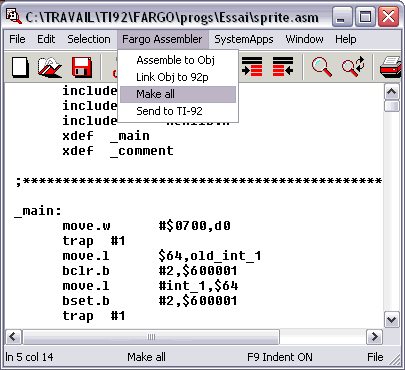
[Fargo Assembler]
Assemble to Obj,C:\TRAVAIL\TI92\FARGO\QEDIT\assemble.bat {a}
Link Obj to 92p,C:\TRAVAIL\TI92\FARGO\QEDIT\link.bat {b}
Make all,C:\TRAVAIL\TI92\FARGO\QEDIT\make.bat {b}
Send to TI-92,C:\Program Files\TI Education\TI-Graph Link 92 - Français\Wlink92.exe
We are now ready to write our first assembly program!
Run Qedit and type the program as it appears next on the right. The important points:
Save this program as "revscr.asm". ATTENTION: the whole pathname for this file should not contain long names. Else, nor the assembler neither the linker will find your file! Just use the old MS-DOS filenames with 8 chars max. | 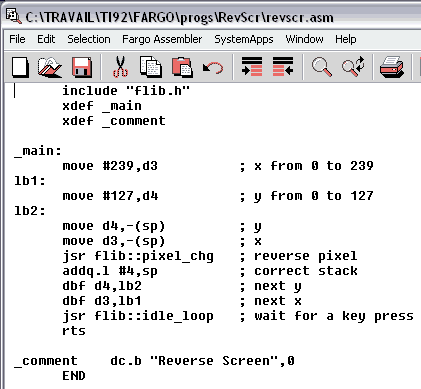
Download the files! |
Then from the menu "Fargo Assembler", clic on "Assemble to Obj" and you'll get the following DOS window: 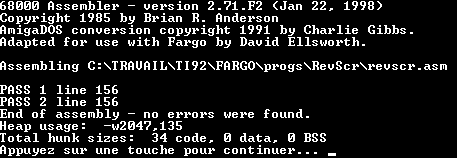
|
To complete the work, run the linker from the menu "Fargo Assembler" choice "Link Obj to 92p", and you'll get this: 
Your file REVSCR.92P is ready to be used by the calculator! |
With TI Graph Link, send the program REVSCR.92P to the calculator. Then run Fargo (with Shift ON) and you'll find, normally in the default folder "main", the following list where revscr appears: 
|
Run revscr, you'll see the screen reversing from right to left until you get this image: It would be faster to reverse the screen memory with NOT, but I wanted to show the library usage. |